Straight Talk on Technology
Two decades of house calls gave me a clear view of what breaks and why. I'll share my insight on what's most common, what's preventable, and how to maintain your machine before something fails.
Is Your Browser Leaving Your Digital Front Door Unlocked?
May 12, 2026Security alert — Microsoft Edge users, this one's for you. Your saved passwords might not be as safe as you think.
⚠️ The Warning
Recent research by security expert Tom Rønning has revealed that Microsoft Edge stores your saved passwords in an unexpectedly insecure way. While browsers typically encrypt passwords, Edge was found keeping them in an unencrypted state in your computer's memory — meaning any program running on your PC could potentially access them.
That's a problem. Because if your passwords are sitting in unencrypted RAM, they become "low-hanging fruit" for malware or malicious scripts to scrape — capturing every login you've ever saved in seconds.
✅ The Fix: Use a Dedicated Password Manager
The solution isn't to stop saving passwords — it's to save them smarter. Dedicated password managers like RoboForm encrypt your credentials with military-grade AES-256 encryption
Benefits of making the switch:
- 🔒 Bank-grade encryption — Only YOU can decrypt your passwords
- 🔑 One master password — Remember just one, never forget the rest
- 📱 Cross-platform sync — Access your passwords securely on your phone, tablet, and PC
- 🛡️ Breach monitoring — Get alerted if your credentials show up in a data leak
💡 Ready to Get Secure?
If you have dozens of passwords saved in Edge and aren't sure how to move them safely, let's talk. We can help you migrate to a professional password manager and clean up your digital footprint — the right way.
🔒 Need help migrating your passwords securely? Give us a call: 609-978-5227
Call NowIs That Microsoft Call Real? And What About Those Scary Popups?
May 5, 2026Two scams. One post. Here's what to watch for — and how to protect yourself.
🚨 Part 1: The Phone Call ("Your Computer Has a Virus")
You pick up. Someone with an accent says they're from Microsoft. They claim your computer is infected, and that you need to let them in right now to fix it.
Sound familiar? It's a scam. 100% of the time.
Microsoft doesn't make unsolicited calls. Ever. Neither does Apple, Google, or any major tech company.
Here's how it actually works:
- They call you out of nowhere — cold call, no warning
- They claim your PC is infected or has errors
- They walk you through installing TeamViewer, AnyDesk, or another remote access tool
- Once they're in, they can see everything — your files, your bank login, your photos
- They demand payment or escalate to draining accounts
Red flags to remember:
- ❌ Unsolicited phone call about your computer
- ❌ Anyone asking you to install software so they can "fix" it
- ❌ Anyone asking for credit card info to "resolve" a virus
- ❌ Urgency and pressure to act immediately
🖥️ Part 2: The Browser Popup ("Call Us NOW")
You're browsing a website — maybe you clicked the wrong link — and suddenly your screen locks. A big red warning appears. It looks like it's from Microsoft. It says your computer is locked and lists a phone number to call.
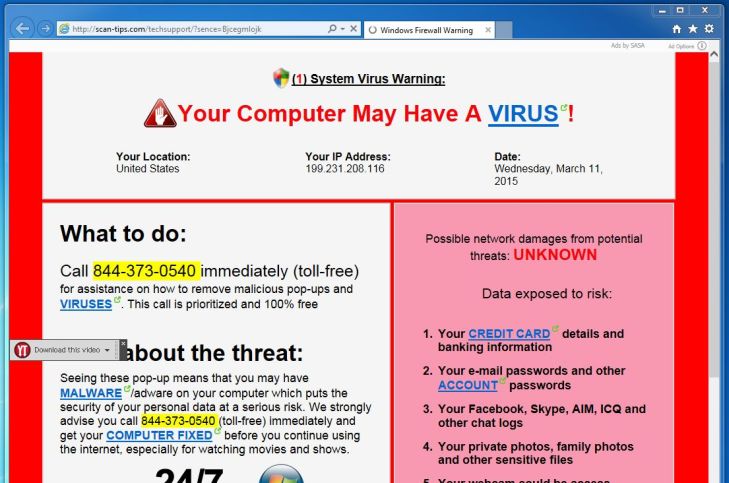
These popups are designed to panic you into calling. Microsoft will never lock your screen like this.
Here's the truth: This is a webpage, not your computer. The popup is just JavaScript running in your browser. You can close it — usually by closing the whole browser tab or restarting your browser in a new window. You do NOT need to call that number.
If you do call? You're right back in the scammer's world — they'll ask for remote access and the cycle starts all over again.
✅ How to Protect Yourself
- Microsoft (and Apple, Google, etc.) will never call you about problems on your computer
- Never install remote access software because someone called you
- If someone asks for your credit card during a tech support call — hang up
- Browser popup locks? Close the tab. If it won't close, restart your browser. Your computer is fine.
- When in doubt, call someone you trust — not the number on the screen
❌ Already Fell For It?
If you've already given someone access to your computer:
- Disconnect from the internet immediately
- Change your passwords from a different device — bank, email, everything
- Call your bank and let them know what happened
- Run a legitimate antivirus scan (like Malwarebytes) to check for any installed software
- If the situation feels out of control — call me. We'll go through it together.
🔒 Think your computer might have been compromised? Give us a call: 609-978-5227
Call NowFree Up GBs of Storage — Before You Delete a Single Photo
April 28, 2026Running out of phone storage? Before you delete anything, check if your photos are already backed up to the cloud.
It's the #1 call I get from clients: "My phone says I'm out of storage." The panic sets in — they start scrolling through their gallery, trying to decide which photos to sacrifice. Don't do it yet.
Most smartphones today automatically back up photos to Google Photos (Android) or iCloud (iPhone). If yours is already syncing, you can safely delete the local copies and pull them back anytime from the cloud — freeing up gigabytes in seconds.
Here's how to check fast:
- Android: Open Google Photos → tap your profile icon → Storage manager → review what's backed up and what's using space
- iPhone: Go to Settings → [Your Name] → iCloud → Photos — if "iCloud Photos" is ON, you're backed up
Once you confirm you're synced, you can go into your phone's Photos app, select the photos you want to remove from the device, and delete them. The cloud copies stay intact.
Pro tip: While you're at it, check your Downloads folder and WhatsApp media — those two are silent storage killers that most people forget about.
📞 Need help freeing up space or setting up automatic backups?
Call 609-978-5227🚨 Scam Alert: Fake "Domain Listing" Invoice in the Mail
April 14, 2026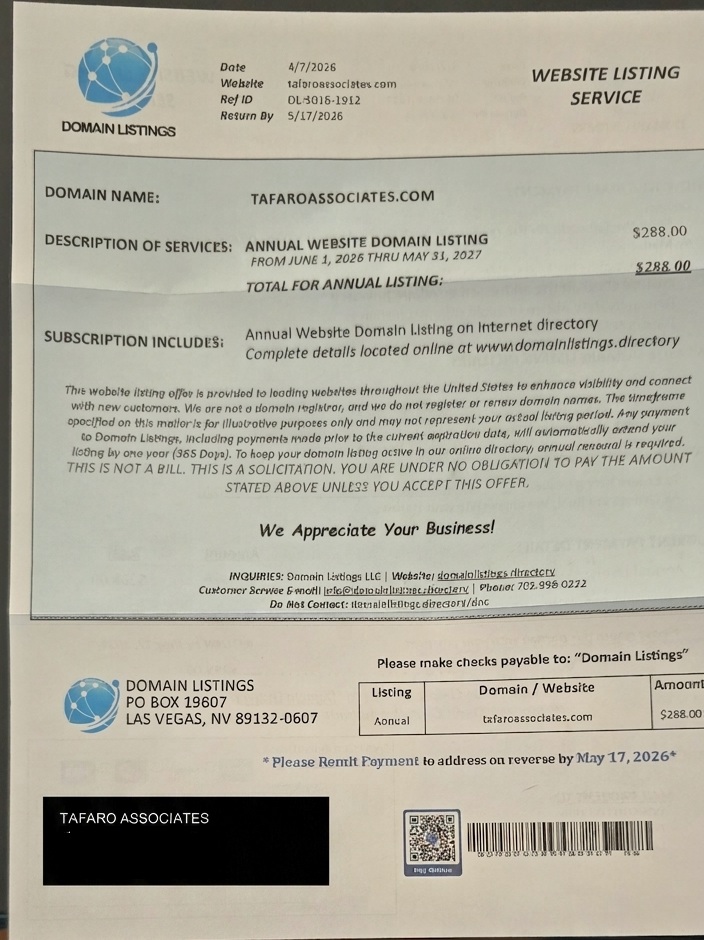
The scam letter we received — address redacted for privacy
If you've received a letter in the mail that looks like an invoice from "Domain Listings" — stop before you pay anything.
We recently received one of these, and it's a classic scam targeting business owners. Here's how to spot it and what to do.
What It Looks Like
The letter is formatted to look like an official domain renewal or listing notice. It includes:
- A prominent dollar amount — in our case: $288.00
- A payment stub with a QR code
- An urgent tone about "ANNUAL WEBSITE DOMAIN LISTING"
- Fine print that says "This is a solicitation" and "Not a bill"
How to Tell It's a Scam
- The fine print gives it away. Read carefully — it literally says "This is a solicitation, not a bill." They're hoping you won't read that part.
- You didn't request it. There's no contract, no service agreement, no prior communication.
- No actual service is provided. Paying this doesn't get your domain listed anywhere meaningful.
- It's designed to confuse. The formatting mimics real invoices so businesses pay out of habit or panic.
What to Do If You Receive One
- Don't pay. Toss it or shred it.
- Report it at reportfraud.ftc.gov
- Already paid? Contact your bank or credit card company immediately to dispute the charge.
Stay safe. Legitimate domain registrars send renewal notices through their official platforms — never through random unsolicited mail. If something looks like a bill but you didn't ask for it, verify before you pay.
Why "Free" Virus Scanners Leave You Exposed
April 10, 2026Every week I show up at someone's home and find their computer crawling with malware — despite having a "free antivirus" installed. Here's what most people don't realize: free scanners only find about 30-40% of active threats. They catch the easy stuff. The sophisticated toolbars, browser hijackers, and crypto miners sail right through.
The other problem? Free scanners don't prevent infections — they react to them. By the time a free scanner flags something, the damage is often already done: passwords stolen, identity quietly monitored, or your computer turned into a spam-sending robot without you knowing.
What I recommend: a layered approach. Good behavior awareness, regular updates, and a quality endpoint protection product. If your computer is already slow or acting strange — pop-ups, new toolbars you didn't install, or a browser that redirects — don't wait. Call me before it gets worse.
Need a malware check? »The Router in Your Closet Is Probably Your Biggest WiFi Problem
April 3, 2026Most WiFi complaints I hear: "The internet is slow." Nine times out of ten, the issue isn't the internet service itself — it's where the router lives. A router stuffed in a closet, tucked behind a TV, or hidden in a basement corner is working against you. WiFi signals don't pass through concrete and wood well. Every wall and floor cuts your speed and range.
Before you call your internet provider or buy a new router, try this: move your existing router to a more central location in your home — elevated if possible, out in the open. You'd be amazed how often this alone doubles your coverage.
If you have a larger home or multiple floors, it might be time to look at a mesh network or access points. I'll come to you, assess your layout, and recommend what's actually needed — not what's most expensive.
WiFi issues? Let's talk »Before You Throw Out That Old Computer — Read This
March 27, 2026I get it. The old laptop is slow, the battery barely holds a charge, and a new one is sitting in your Amazon cart. But before you recycle or trash that machine, consider this: hard drives contain everything about you. Tax returns. Bank statements. Medical records. Photos you thought were backed up somewhere. A simple "empty trash" does nothing.
When I set up a new computer for a client, the first thing I always ask is: what happened to the old one? If it contains personal data, we either physically destroy the drive or wipe it properly. That's not paranoia — that's basic privacy.
If the computer is more than 5 years old and running slow, it might just need a clean Windows reinstall, more RAM, or a new SSD. For many people, that $100 upgrade extends the life of the machine for another 3-4 years. Worth checking before buying new.
Ask me before you replace it »That "Reset Password" Email Could Be a Scam
March 20, 2026Phishing emails are more convincing than ever. The latest scam I'm seeing: you get an email that looks exactly like it's from Amazon, Netflix, or your bank — real logos, real formatting, perfect replicas. It says someone tried to reset your password and asks you to click a link "immediately" to verify your account.
Here's how to check if it's real: never click the link in the email. Instead, open a new browser tab and go directly to the service's website by typing the address yourself. If there's a real issue with your account, it will show up when you log in directly. The same goes for text messages — if your "bank" texts you a link, call them back using the number on your card.
When in doubt, don't click. Call me. I'd rather you call me about a suspicious email than have you wire money to a scammer.
Your Smart Home Camera Is Only as Secure as Your WiFi Password
March 13, 2026Home security cameras are one of the most requested items I install these days. People love being able to check who's at the front door from their phone while they're at work. But there's a dark side I have to warn every client about: if your WiFi password is weak or shared with too many people, that camera is a window into your home for anyone who knows what they're doing.
Basic security checklist I walk every camera client through: change the default admin password immediately, enable two-factor authentication if the app supports it, keep the firmware updated, and use a strong unique WiFi password. Yes, it's more work. But it's the difference between a camera that protects you and one that streams your living room to strangers.
Security camera installation »